Xrom Main Features :
512 Mbit (equal to 64 Mbyte) of space to save your ROMS
USB-to-GBA Link programmer, Pogo Shell compatible,
Built in RTC (Real Time Clock),
XCode Cheat plugin supported
30 Day Money Back & One Year Warranty |

Review by xAix |
|
X-ROM 512 Mb
Installing Xrom Linker
Im reviwing the latest and simplest
gameboy linker which is called the GBA-XROM 512 which i
bought from Easybuy2000.com. When i first got the
package it was just a simple linker and a 512Mbit
catridge. There was no CD no manual no package all i got
was the linker and the flash card it self. So i wondered
how do i get this working without an installation driver
cd ? lol ...
 ----------- ----------- 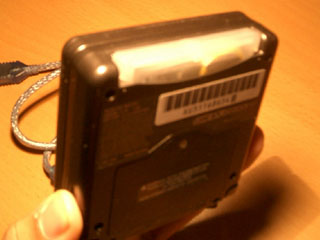
The catridge was the flushed type catridge
so theres no budging out like the old FLASH LINKER i use
to have the 128Mbit is sticking out of the gameboy and
its so damn tight to take it off... Unline this one it
flushed right into the gameboy and its EASY to take out.
The only thing i wished is that the catridge was black.
Heheheheh ;)
So i started off by plugging in the X-ROM
behind the gba... then plugging the usb cable to my
pc.
 ----------- ----------- 
You'll first be prompted to install the
hardware driver .. damn it didnt came wit the driver so
i had to search for the driver. Luckily its available so
i downloaded it. You
can download it here. The first default installation
was unsuccessful coz the driver wasnt install yet. So i
click the setup.exe file and started to install the
driver. It will look something like this :
 ----------- ----------- 
The installation is simple just NEXT NEXT
NEXT till u reach the end :) LOL Youll be prompted with
a warning that the driver isnt signed by microsoft etc
bla bla STOP or CONTINUE. Just hit continue and the
driver will be installed.
 ----------- ----------- 
If you see the end isntallation light the
picture on the right .. then u installed it succesfully.
Congratulations ME. Hahahah. So after installing the
driver i remove and inserted my X-ROM again from the pc
then only it started to install the driver correctly. It
will prompt out the warning again but this time its the
XROM Final Driver so just click
Continue Anyway after u remove and plug it back in. Or
to make it simple 1 go. Before u insert the XROM into
your pc just install the driver first ;)
 Continue to Xrom Software >>> Continue to Xrom Software >>>
|